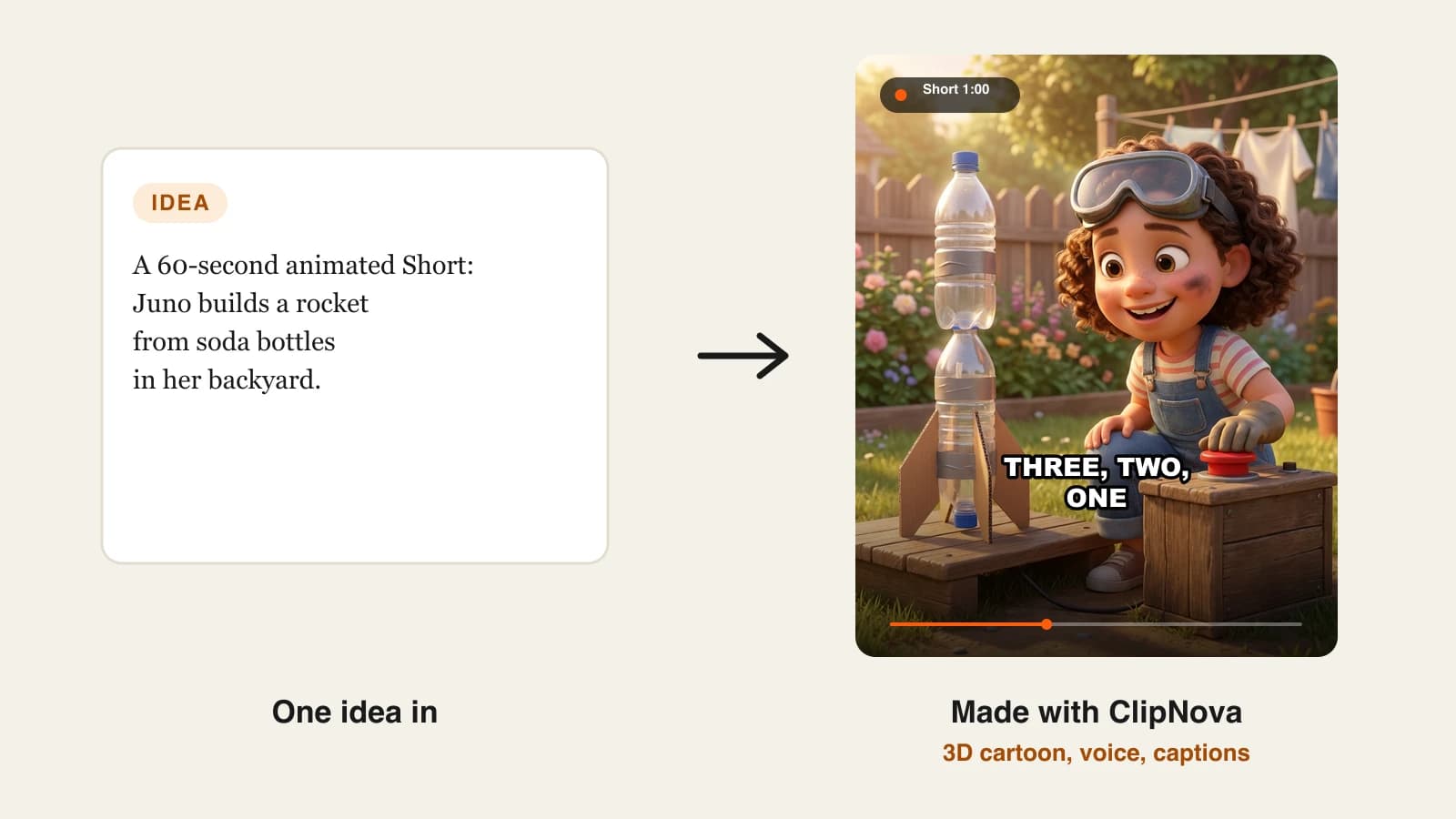
To make an AI animated video, pick one animation style, lock your main character in a reference image, write a short script with one line per scene, and let an AI animation generator turn each line into an animated, narrated and captioned scene. With a tool like ClipNova that is one prompt or one pasted script, and a 60-second Short comes back as a finished video you can review and post.
The hard part is not getting a cartoon out of a prompt. It is getting the same cartoon twice. Most first attempts fail in the same places: the hero changes colour between shots, the style drifts from 3D to flat 2D halfway through, and the story has more scenes than the narration can carry. This guide fixes those in order, and one example runs through every step: Tico Finds It, a 60-second 3D animated Short about a tiny robot taxi who returns lost things in the rain.
Want to skip ahead? The ClipNova AI animation generator turns a story or a script into an animated video in 3D, claymation, anime and other styles, with narration, captions and music in one render. Plans from $19/mo.
What makes an AI animated video look professional
None of these is "a better model". They are decisions you make before you generate anything:
- One style for the whole video. Mixing a 3D intro with a watercolor middle looks like a mistake, not a choice.
- A character that never changes. Viewers forgive simple animation. They do not forgive a hero who is yellow in shot one and orange in shot four.
- Few scenes, each with one action. Six to eight scenes carry a 60-second Short. Twenty scenes turn into a slideshow.
- Narration that leads the pictures. In a faceless animated video the voice tells the story and each scene illustrates one line.
- A clear ending. Animated Shorts get rewatched when the last shot pays off the first one.
The example: Tico Finds It
Tico is a small, round, yellow robot taxi with teal headlight eyes. In each episode he finds something someone lost in the city and returns it before the owner notices. Episode one: a red umbrella left at a bus stop, returned to a little girl just as the rain gets heavier.
- Format: 60-second vertical Short for YouTube Shorts, TikTok and Reels, one episode a week.
- Style: 3D cartoon, warm dusk light, rainy cobblestone city.
- Voice: one warm narrator. Tico does not speak, which keeps the character simple and the story easy to follow in any language.
Everything below is the production plan for that episode.
Step 1: Pick the animation style before you write
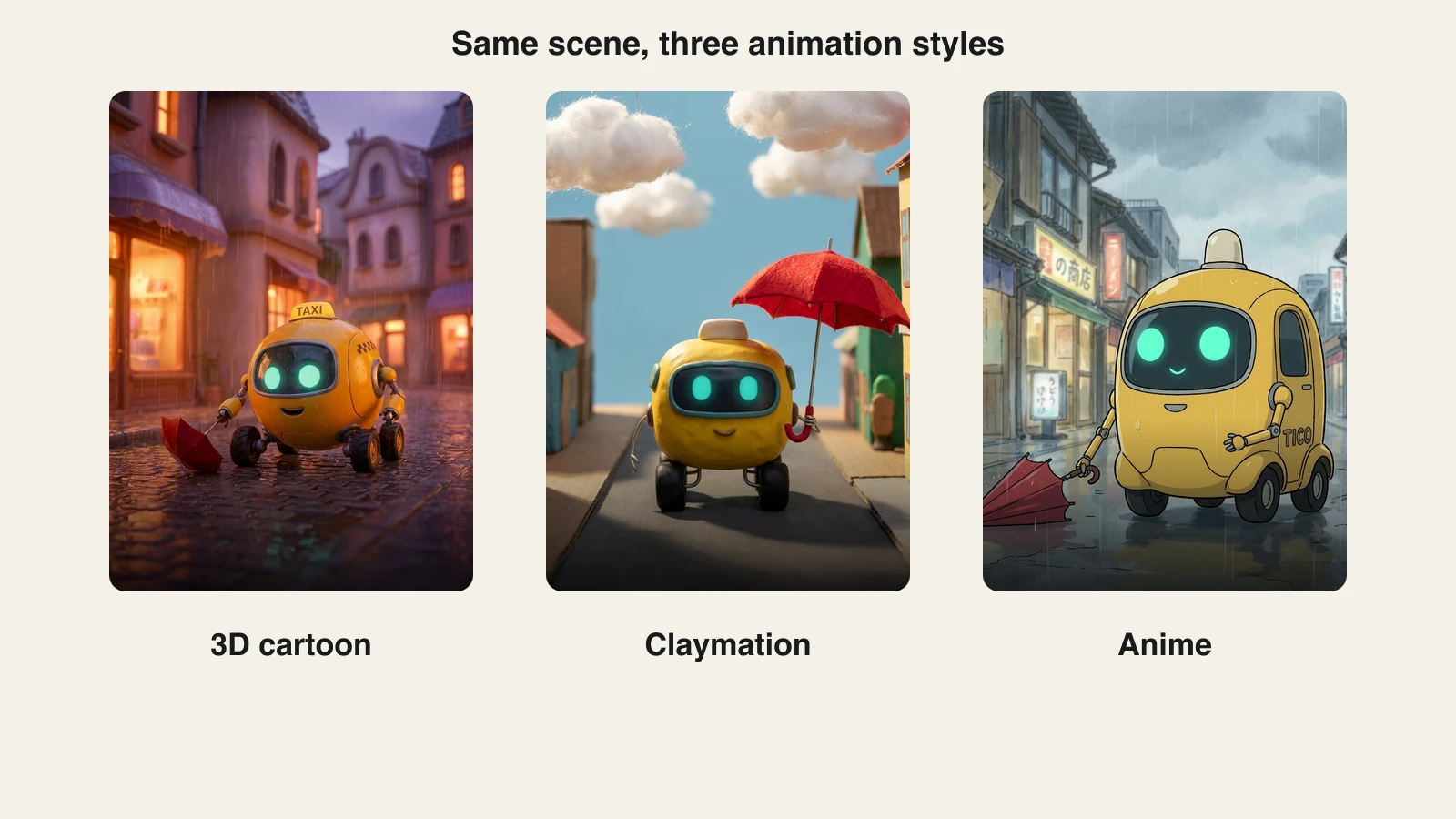
The style decides what your script can ask for. Claymation suits slow, charming scenes; anime suits motion and emotion; 3D cartoon suits almost anything a family audience watches. Decide first, then write scenes the style does well.
| Style | Best for | Watch out for |
|---|---|---|
| 3D cartoon | Kids stories, mascots, comedy, explainers | Crowded scenes lose the character |
| Claymation and stop motion | Cozy stories, short gags, food and craft topics | Fast action looks wrong in clay |
| Anime | Drama, action, emotional stories | Needs strong lighting and framing to read on a phone |
| Watercolor storybook | Bedtime stories, fables, poems | Low contrast can blur small details |
| Pixel art | Gaming topics, retro humour | Fine detail and text disappear at small sizes |
Render one test scene in two or three styles and pick the one where your character reads best at phone size. For Tico, 3D won: the yellow body and teal eyes stayed clear even in the rain.
Step 2: Design one character and lock it
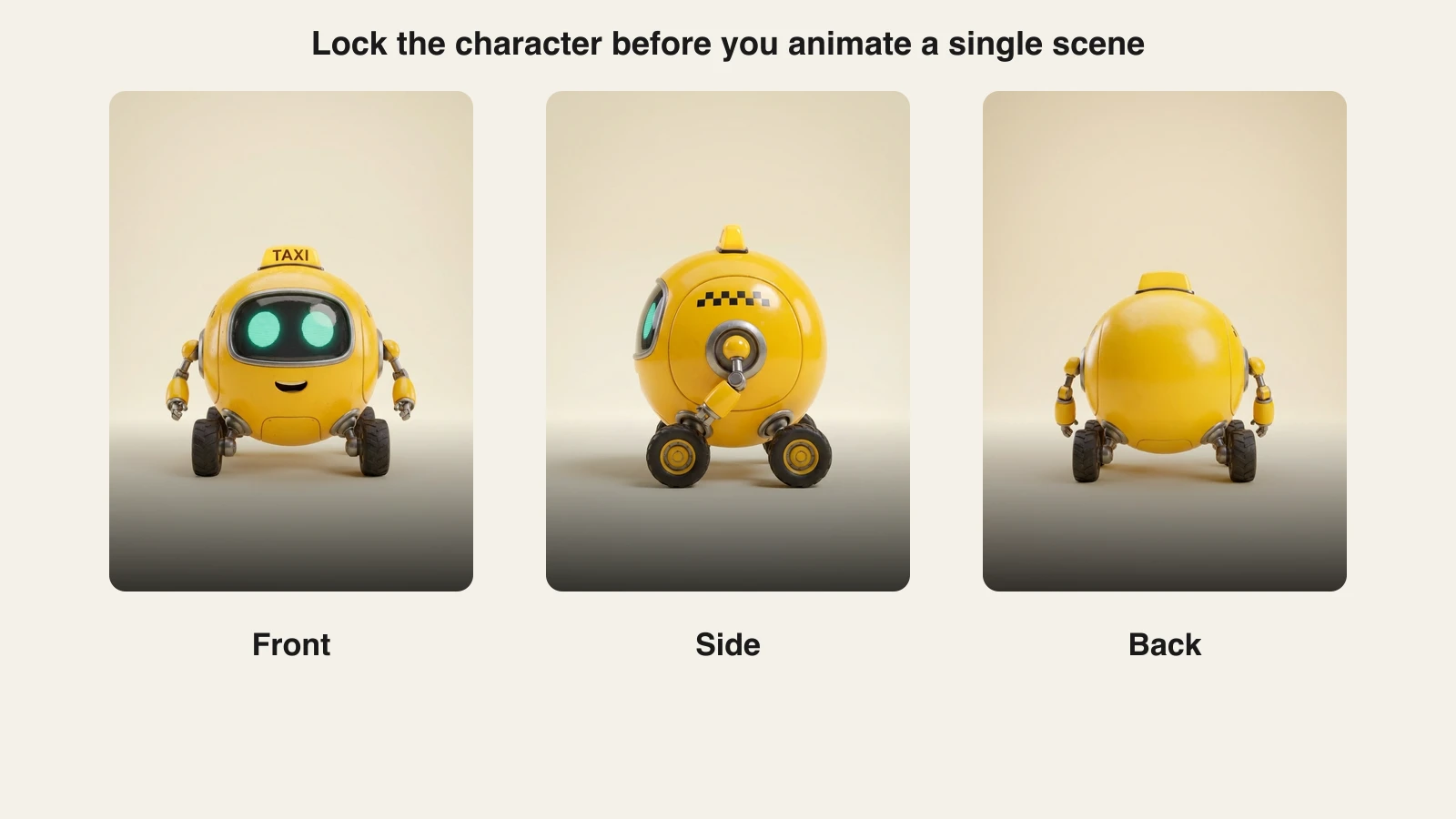
AI models redraw the character from scratch in every scene. If all they get is "a robot taxi", you get a different robot each time. The fix is a reference: one clear image of the character, ideally a front, side and back view, that every scene is generated from.
- Write a one-sentence character description with fixed colours and shapes: "a small round yellow robot taxi with teal glowing eyes on a dark visor, a little roof light, thin arms and four black wheels".
- Generate a front view on a plain background and keep regenerating until it is exactly right.
- Use that image as the reference for every scene. ClipNova's consistent character AI video generator builds the video from a reference like this so the face, colours and proportions hold from the first scene to the last.
- Save the description and the image in one folder. You will reuse both in every episode.
Step 3: Write a script that animation can carry
A 60-second Short holds about 140 to 160 narrated words. Split them into six to eight beats, one action per beat, and add a visual cue under each line so the generator knows what to animate. For more on structure, see how to write a faceless video script.
Tico's episode one, abridged:
| Time | Narration | Visual |
|---|---|---|
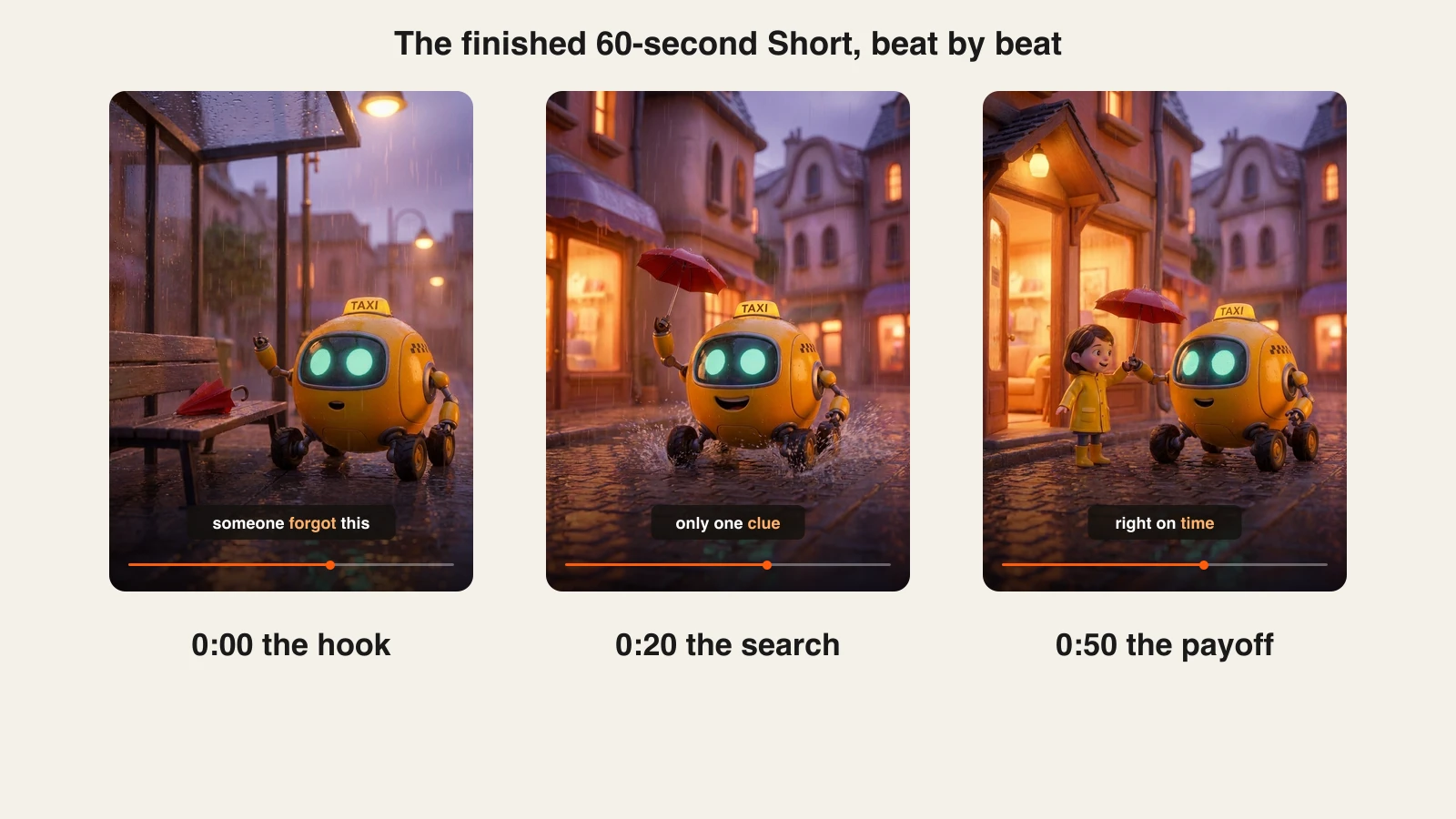
| 0:00 | "Someone forgot this. And the rain is getting worse." | Tico stops beside a red umbrella on a wet bus stop bench |
| 0:08 | "Tico has one rule: everything goes home before dark." | Close-up of Tico's eyes brightening |
| 0:20 | "Only one clue: a yellow sticker shaped like a duck." | Tico races through puddles, umbrella held high |
| 0:35 | "Ten streets, nine yellow doors, one duck." | Quick shots of doors, then the duck sticker |
| 0:50 | "Right on time." | Tico hands the umbrella to a girl in a yellow raincoat |
| 0:56 | "Tomorrow, something bigger goes missing." | Tico drives off into the rain |
The first line is a hook that raises a question in under three seconds. The last line points to the next episode, which is what turns one video into a series people follow.
Step 4: Generate the animated video
Now the script becomes a video. The generator has to do six jobs in one run: split the script into scenes, keep the character consistent, animate each scene in the chosen style, record the narration, add captions and export in the right format.
- 1. ClipNova: the complete option. Paste the script (ClipNova follows a pasted script line by line instead of writing its own), choose the 3D cartoon style, add Tico's reference image, pick a warm narrator voice and turn on word-by-word captions. Choose 9:16 for Shorts, TikTok and Reels or 16:9 for YouTube. Each scene is animated with a current video model such as Veo 3.1, Kling 3.0 or Sora 2, narration is available in 18 languages, and one render can run up to 5 minutes at up to 1080p. Plans from $19/mo, and every plan includes every feature.
Other tools can produce animated clips, but most return 5 to 10 seconds per prompt and leave the scene order, narration and captions to you. Our roundup of the best AI text to video generators compares what each one gives back from a single prompt.
Step 5: Review every scene and fix the weak one
Even with a locked character, one scene in a batch usually comes out off: a wheel missing, the umbrella in the wrong hand, a background that ignores the rain. Watch the whole video once at phone size with the sound on, then once muted to check the captions.
- Character check: same colours, same eyes, same number of wheels in every scene.
- Story check: each scene shows the line it sits under.
- Caption check: names spelled right, nothing covering the character's face.
Fix the weak scene on its own instead of regenerating the whole video. ClipNova's scene editor redoes one scene and keeps the rest, which saves both time and credits.
Keep a short list of the prompts that produced your best scenes, such as the camera angle, the light and the weather. Reusing them in the next episode is the fastest way to keep a series looking like one show.
Step 6: Turn one Short into a series
A single animated Short is a test. A series is what grows a channel, and the work you did in steps 1 to 3 is reusable:
- Same style, character reference and narrator in every episode.
- New object, new street, same rule: episode two is a lost kite, episode three a lost puppy. The structure stays, the story changes.
- A longer cut once a week: combine three episodes into a 16:9 video of 3 to 5 minutes for YouTube.
- Audience settings: if the series is aimed at children, set it as made for kids in YouTube Studio. YouTube says that choice is your legal responsibility under COPPA. Clearly animated, non-realistic scenes do not need YouTube's altered or synthetic content label.
Give every episode its own story. YouTube does not monetize mass-produced, repetitive videos, and a recurring character with a fresh plot each week is the opposite of that.
How long does it take?
For a 60-second episode like Tico Finds It, once the style and character are locked:
- Story idea and script: 20 minutes.
- Generation: one render, done while you write the next script.
- Review and fixing one or two scenes: 10 to 15 minutes.
- Title, upload and cross-posting: 5 minutes.
About 45 minutes per episode. The style test and character sheet take an hour or two once and carry the whole series. Plans from $19/mo, with every feature included; only the monthly credits change.
What goes wrong, and the fix
- The character changes between scenes. The model only had a text description. Generate from a reference image every time and keep the description identical.
- The style drifts. Different scenes were prompted with different style words. Choose one style preset and never add competing words like "realistic" or "anime" to single scenes.
- Too many scenes. Twenty scenes in 60 seconds feels like a slideshow. Cut to six to eight beats with one action each.
- Narration and pictures disagree. The scene shows something the voice is not saying. Put a visual cue under every script line.
- Captions hide the action. Big captions over the character's face kill the shot. Keep captions in the lower third and check them muted.
- Every episode feels the same. Same plot with a new object reads as repetitive. Change the problem, the place and the twist, and keep only the character and the rule.
Write the first episode of your own series this week: one character, one rule, six beats. Then generate it in ClipNova, and when you have five episodes, use how to start a faceless YouTube channel to plan the channel around them.
Frequently asked
How do I make an AI animated video?
Pick one animation style, create a reference image of your main character, write a short script with one line per scene, then generate the video with an AI animation generator. ClipNova turns a prompt or a pasted script into an animated video with narration, captions and music in one render, up to 5 minutes long.
How do I keep the same character in every scene?
Generate every scene from the same reference image of the character, not just a text description, and keep the description identical across scenes and episodes. A front, side and back view on a plain background works best. Tools built for consistent characters, such as ClipNova, use that reference for every scene.
Which animation styles can AI make?
Current tools handle 3D cartoon, claymation and stop motion, anime, watercolor storybook and pixel art, among others. Pick one style per video and per series, because switching styles between scenes looks like an error to viewers.
How long does it take to make an AI animated video?
Once the style and character are set, a 60-second animated Short takes about 45 minutes: around 20 minutes to write the script, one render, 10 to 15 minutes to review and fix weak scenes, and 5 minutes to upload. The first style test and character sheet take an hour or two once.
Can I monetize AI animated videos on YouTube?
Yes, if each video is original. YouTube does not monetize mass-produced or repetitive content, so give every episode its own story. Clearly animated, non-realistic videos do not need the altered or synthetic content label, but videos aimed at children must be set as made for kids.
How much does it cost to make AI animated videos?
With ClipNova, plans start at $19 a month and every plan includes every feature, commercial rights and watermark-free export; higher plans only add monthly credits. That replaces separate subscriptions for a video model, a voice tool and a caption editor.
Can AI animate my own character?
Yes. Upload a clear image of your character as the reference and describe it the same way every time. The generator animates new scenes around that design, so a mascot or a character you drew can star in a whole series.