To make AI talking baby videos, give the baby a personality first, create it once as a saved character, write short scripts with a setup, a complaint and a punchline, and pick a tool that makes the baby say the lines on screen with lip sync. For a recurring show, keep the same baby, the same voice and the same set every episode.
One talking baby clip is easy: upload a photo, type a line, done. A talking baby channel is harder. By episode five the face has drifted, the voice has changed and the jokes all sound the same, because nothing tied the baby to a character in the first place. This guide shows how to build a talking baby that people follow, not just one clip that gets a laugh. One example runs through every step: Tiny Takes with Juno, a weekly 60-second baby podcast where a ten-month-old interviews the household about the things that annoy her.
Want to start now? ClipNova's AI baby video generator makes finished long videos with consistent characters: save the baby once and she talks on screen with lip sync, in the same look in every scene, with voice, captions and music done, for episodes of up to 5 minutes.
What makes a talking baby video work
The format went viral fast, and most copies fade just as fast. The ones that last share a few things:
- A personality, not a gimmick. "Baby talks" is a novelty for one video. "Bossy baby who reviews the household like a critic" is a show.
- The same face every time. Viewers come back for a character. If the curls or the headphones change, she becomes a stranger.
- An adult voice in a baby body. The joke is the gap: a calm, slightly tired grown-up voice coming out of a baby. A squeaky toddler filter kills it.
- A punchline in the last five seconds. Short-form viewers forgive a slow middle if the ending lands, and the ending is what they share.
- A fixed set. The podcast desk, the mic and the lamp make every episode recognizable in the feed before the first word.
The example: Tiny Takes with Juno
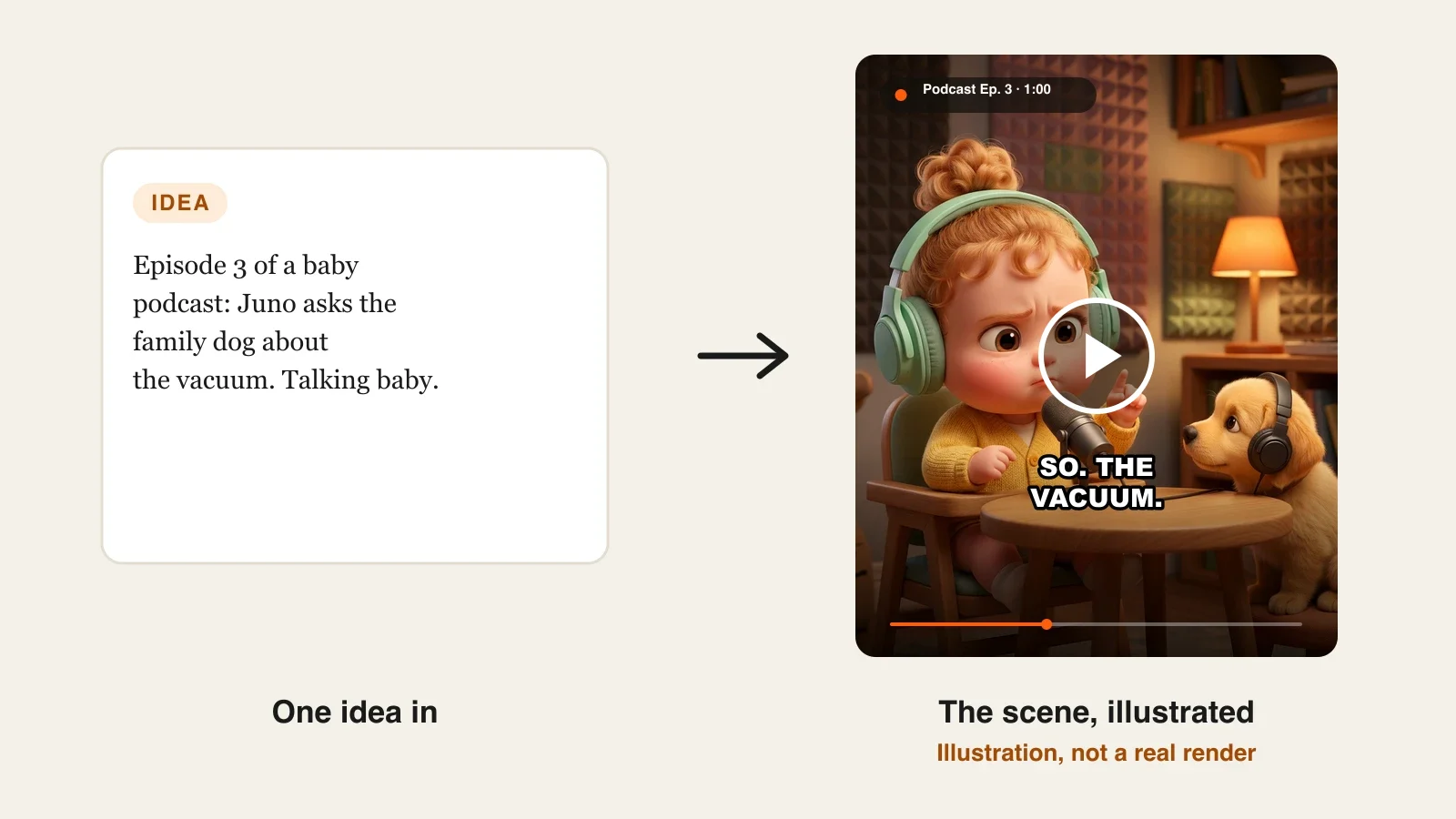
Tiny Takes with Juno is a weekly 60-second vertical podcast for TikTok, Instagram Reels and YouTube Shorts. Juno is ten months old, sits behind a tiny podcast desk in mint headphones, and each week puts one "guest" in the hot seat: the family dog, the vacuum cleaner, Grandma's kisses. One episode goes out every Sunday, with a longer three-minute special each month. Everything below is the production plan for that show.
Step 1: Write the baby's personality in three lines
Why: without a personality, every script turns into a random joke, and random jokes do not build a following. Three lines are enough to write fifty episodes in the same voice.
- Who she is: age, look and one defining trait.
- How she talks: sentence length, favorite words, what she never says.
- What she cares about: the topics she has opinions on.
Applied to the example:
| Line | Juno |
|---|---|
| Who she is | Ten months old, strawberry-blond top knot, mint headphones, yellow cardigan. Takes herself extremely seriously. |
| How she talks | Short, dry sentences. Calls everyone by their full title ("Mr. Vacuum"). Never says "goo goo". |
| What she cares about | Nap schedules, snacks, anything louder than her, the dog's loyalty. |
Keep this table next to you every time you write. If a line does not sound like Juno, cut it.
Step 2: Create the baby once and lock the look
Why: if you describe the baby fresh each time, or re-upload a slightly different photo, the face drifts. Creating her once as a saved character fixes the face, hair and outfit for every scene and every episode.
- Decide AI-created or real. An AI baby from a description keeps your own child off the internet; a real photo should only ever be one you have the right to use, such as your own child's, never someone else's.
- Write the look in one sentence of physical details.
- In ClipNova, open the AI Character studio, describe the baby (or upload the photo), name her and lock the look.
- Pick the style once and keep it. A soft 3D look is easy to watch and clearly not a real child; a realistic look is more striking but needs an AI label on YouTube.
Applied to the example: "Baby girl, ten months, chubby cheeks, strawberry-blond curls in one small top knot, big brown eyes, mint-green headphones, yellow knitted cardigan." Saved as Juno, in a warm Pixar-like 3D style.
Step 3: Cast the guests and fix the set
Why: a podcast needs a guest, and a show needs a home. Saving the recurring guests as characters means the dog in episode 9 is the same dog as in episode 2.
- Recurring guests: save each one as a character with its own look. In a ClipNova Series you can hold up to 8 characters for a whole show, with story memory of the last five episodes.
- One-off guests: objects (the vacuum, a broccoli floret) can be described in the scene instead of saved.
- The set: describe it the same way every episode and reuse the exact words.
Applied to the example: Juno and Biscuit, a golden retriever puppy in his own small headphones, are saved in a ClipNova series. The set line never changes: "cozy home podcast studio, foam panels, warm lamp, small round wooden desk with a padded studio microphone". Biscuit never speaks; he reacts, which keeps the joke on Juno.
Step 4: Write a 60-second script in four beats
Why: a talking-baby joke is a tiny sketch. Without structure, the punchline arrives too early or not at all. At a calm pace, 60 seconds holds about 130 to 150 spoken words, which is less than most people write.
| Time | Beat | What happens |
|---|---|---|
| 0:00 to 0:04 | Cold open | Juno states the topic like breaking news |
| 0:04 to 0:30 | The case | Two or three complaints, each shorter than the last |
| 0:30 to 0:50 | The guest | A question to the guest and a reaction |
| 0:50 to 1:00 | Punchline | A verdict that flips the episode |
Applied to the example, episode 3, "The Vacuum":
- 0:00 "Welcome back to Tiny Takes. Today's guest could not be here, because today's guest is the problem."
- 0:06 "Mr. Vacuum comes out every Tuesday. He is loud. He eats my crumbs. Those were my crumbs."
- 0:32 "Biscuit. You were there. Did you or did you not run under the sofa?" (Biscuit lowers his ears.)
- 0:52 "Final verdict: Mr. Vacuum is banned. Biscuit is on probation. Same time next week."
Paste the whole script with every line Juno says, so the words in the video are your words.
Step 5: Choose who speaks and the quality
Why: a talking-baby podcast only works if the baby is the one talking, on screen, with her mouth matching the words. A narrator over a silent baby is a different format, better suited to bedtime stories.
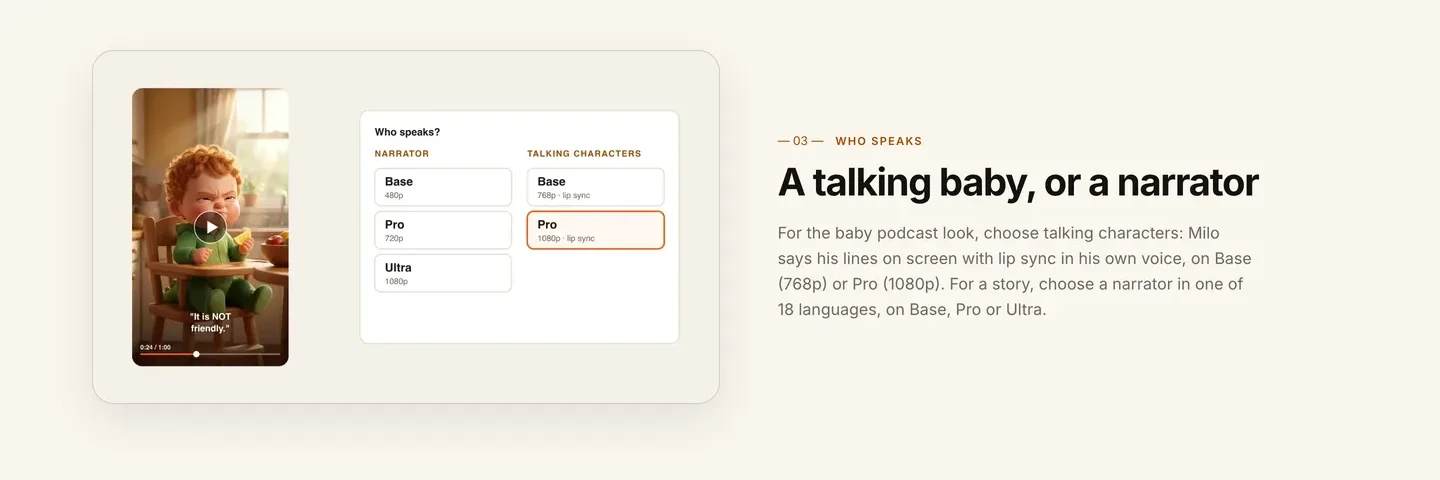
1. ClipNova: the complete option for a baby who talks, scene after scene. The video can run up to 5 minutes, the saved baby keeps the same face in every scene, and the voice, captions and music come in the same render, with Studio to redo any single scene afterwards.
- Talking characters: the baby says her lines on screen with lip sync in her own voice, on Base (768p) or Pro (1080p). This is the baby podcast look.
- Narrator: one voice tells the story over the scenes, in one of 18 languages, on Base, Pro or Ultra. Use it for the monthly bedtime-story special.
- Ratio: 9:16 for TikTok, Reels and Shorts; 16:9 or 1:1 are there too, chosen per video.
Other tools that animate a single baby photo (Revid, HeyGen, JoggAI) can make the close-up, but they keep one framing and do not save the baby as a character, so you rebuild the consistency yourself each week.
Applied to the example: talking characters on Pro for 1080p, 9:16, a calm and slightly deadpan adult female voice for Juno, captions on, a soft lo-fi bed under the voice. Plans from $19/mo, and the app shows the credit cost before you generate.
Step 6: Generate, then fix single scenes
Why: in a minute of video, one or two shots usually miss: a smile where there should be a frown, Biscuit without his headphones, a hand at a strange angle. Remaking the whole episode for one shot wastes credits and time.
- Generate the episode and watch it on your phone, with sound, as a viewer would.
- Note every scene where the expression fights the line. The punchline scene matters most.
- Open the video in Studio, adjust that scene's description, and regenerate only that scene.
- Check the captions: they are synced to the voice, so a misheard word shows up there first.
Applied to the example: say Juno smiles on "Mr. Vacuum is banned". Regenerate only that scene with "stern face, eyebrows down, one finger raised", and leave the rest of the episode as it is.
Keep a file of "fix lines" that worked, such as the stern-face description above. Juno has a small set of expressions (stern, suspicious, smug), and reusing the same wording for each one keeps her reactions consistent from episode to episode.
Step 7: Post it as a show
- Name the series in every title. "Tiny Takes with Juno, Ep. 3: The Vacuum" tells new viewers there is more.
- Label realistic AI. YouTube asks creators to disclose realistic altered or synthetic content that could be mistaken for a real person. A photoreal baby should carry the label; a clearly 3D cartoon baby usually does not need it.
- Set the audience honestly. A baby on screen does not make a video made for kids. A deadpan podcast for adults is not; if you make a bedtime story for toddlers, YouTube requires you to mark it made for kids.
- Post on a fixed day and pin the first episode so new viewers start at the beginning.
For account setup on the short-form side, see how to start a faceless TikTok account.
How long does it take?
For one 60-second episode of Tiny Takes with Juno:
- Personality, character and set (Steps 1 to 3): about an hour, once
- Script: 20 to 30 minutes per episode
- Settings and generation: 5 minutes of clicks, then a few minutes of waiting
- Review and scene fixes: 15 to 20 minutes
- Titles, captions and posting: 10 minutes
After the one-off setup, each weekly episode takes about an hour of your time, most of it writing. Plans from $19/mo, with every feature included; only the monthly credits change.
What goes wrong, and the fix
- A new face every episode. Re-uploading or re-describing the baby makes her drift. Create her once as a saved character and only ever add that character.
- A squeaky baby voice. It is funny for three seconds and grating after ten. Pick a calm adult voice and let the contrast do the work.
- No punchline. Episodes that just list complaints end flat. Write the last line first, then build the script toward it.
- Scripts that are too long. Past about 150 words, a 60-second episode rushes. Cut the middle, never the ending.
- Using someone else's child. Never upload a photo of a child who is not yours. An AI-created baby is safer and easier to keep consistent.
- Making it for kids by accident. If your jokes are for adults, keep the topics adult (bills, naps, in-laws) and set the audience accordingly.
- Changing the set. A new background every week makes the show harder to recognize. Reuse the same set line word for word.
Write Juno's three personality lines tonight, or your own baby's, and draft the first four-beat script. When you are ready to compare tools side by side, our roundup of the best AI baby video generators covers the options, and ClipNova pricing shows what each plan includes.
Frequently asked
How do you make an AI talking baby video?
Create the baby once as a saved character from a description or a photo you have the right to use, write a short script with every line the baby says, and choose a mode where the baby speaks on screen with lip sync. In ClipNova that is talking characters, which add the voice, captions and music in the same render.
What app makes the viral baby podcast videos?
Several tools can make a baby photo talk, including ClipNova, Revid, HeyGen and JoggAI. ClipNova is built for a recurring baby host, because it saves the baby as a character and keeps the same face across scenes and episodes, up to 5 minutes per video.
How long should a talking baby video be?
Most talking-baby podcasts work at 30 to 60 seconds, which fits about 130 to 150 spoken words at a calm pace. Longer specials of 2 to 5 minutes, such as bedtime stories or day-in-the-life vlogs, work once viewers know the character.
Can I make my own baby talk with AI?
Yes, if the photo is of your own child or you otherwise have the right to use it. Never upload another family's child. Many creators prefer an AI-created baby so their real child stays private.
How do I keep the baby looking the same in every episode?
Save the baby as a character with a locked look and reuse it, instead of re-uploading photos or rewriting the description. Keep the same set description word for word too. A ClipNova Series holds up to 8 characters and remembers the last five episodes.
Do AI talking baby videos count as made for kids?
Not automatically. A baby on screen does not make a video made for kids; the audience does. A deadpan podcast with adult jokes is not made for kids, while a bedtime story aimed at toddlers is and must be marked that way on YouTube.
How much does it cost to make AI talking baby videos?
ClipNova plans start at $19 a month for 1,000 credits, with every feature on every plan, and the app shows the credit cost of each episode before you generate. Talking characters use AI Video, which costs more credits than Moving AI Images.
What is the best tool for a talking baby channel?
ClipNova is a complete option: save the baby once, write the script, and get a finished episode with lip sync, captions and music in 9:16, 16:9 or 1:1, up to 5 minutes, with narration in 18 languages for story episodes, on plans from $19 a month.